
Abstract
Data and artificial intelligence (AI) models lack the governance and protective mechanisms that traditional applications enjoy through software engineering (DevOps) practices in industry. The complexities of the enterprise CI/CD pipelines, which span across source control, continuous integration, continuous delivery deployments, testing, monitoring for observability, blocking and telemetry for production, enterprise dashboards with pipelines and project health, for AI models and Data in Enterprise environments is presented. Data at Rest, Metadata and Smart data through automation that provide lineage and tracking automation for ML models are discussed. Cloud DevOps ecosystem built with Azure DevOps repository and Pipelines with extensions, which enables orchestration creation and data pipeline YAML templates that embrace best CI/CD practices guide is discussed with detailed indices for enterprise reference. The enterprise ecosystem provides seamless package management integrated with other Azure DevOps extensions and third-party services availability. The pipelines provide the ability to deploy to any environments read from the pipeline YAML config. The development of pipeline YAML is driven as per the extensions installed and project structure for easy consumption by developers with integrated documentation and additional metadata to help in easy maintainability. These pipelines templates can be used to build, test, and publish data artifacts in enterprise data pipeline, enterprise database automation.
1. Introduction
Enterprise-scale Azure DevOps CI/CD pipelines have been designed and implemented to automate the promotion of Azure data artifacts across non-production and production environments. The solution enables the integrated use of both infrastructure-as-code and application code-as-infrastructure concepts and patterns for data artifacts in Azure DevOps. Enterprises often host large Azure data lakes and Azure Data Warehouse or Azure Synapse Analytics data warehouses whose architecture can naturally lend themselves to the automation of source code management (SCM) and CI/CD pipelines. Managed-connectors for Microsoft Power Automate can also be treated as data artifacts. However, unlike other Azure DevOps application code projects, no built-in mechanisms exist for Azure data artifacts to prevent the manual propagation of changes across environments [1].
Enterprises typically have dedicated teams to manage infrastructure (cloud resources, access, connectors, secrets, etc.) and application code. Consequently, application-code CI/CD pipelines rely on at least a minimum set of access rights broadly consistent across environments. Source code management (SCM) practices are also defined for platform-as-code and application-code-as-infrastructure resources. For data artifacts, the desire is to extend CI/CD principles by introducing a promote-and-stabilize pattern that packages changes into dedicated infer-management platforms at controlled points in time, blocks changes in stable environments, and only then applies the promoted set of changes into production [2].
1.1. Background and Significance
RPO and RTO are increasingly critical for data-driven enterprises. To achieve these goals, companies are investing in enterprise data-serving platforms that combine high-speed ingestion with on-demand data-science capabilities. For continued success, the platform must not only meet the needs of the present but also be able to adapt to unprecedented changes in the future.
A Data observability capability is required to monitor and secure inbound and outbound data access, as well as data quality, completeness, and trust. Moreover, CI/CD practices should be implemented to automate Data-at-Rest (DAR) and ETL Data-in-Motion (DIM) processes, while Data-in-Use (DIU) transformation processes employed by data-science Teams must operate in a self-service mode. Large data-processing platforms therefore require the Continuous Integration and Continuous Deployment (CI/CD) automation considered by this work, including monitoring and observability best practices. Pipelines should be template driven and support a variety of data-format artifacts (e.g. json, parquet, avro) stored in a data lake and consumed by a data warehouse available for business Intelligence [3].
CI/CD pipelines have existed in the software-development world for years. Azure DevOps is Microsoft’s offering to this ecosystem. Enterprise-ready Data-at-Rest, Data-in-Motion, and Data-in-Use processes are now appearing in organizations, and their CI/CD Automation should follow best practices adopted in the software-development world. Data-artifacts Automation allows for faster adoption of data and data science in organizations. When segmented and merged with the appropriate monitoring/observability, the Data-at-Rest process achieves 2020 RTO and RPO targets [4].
1.2. Research design
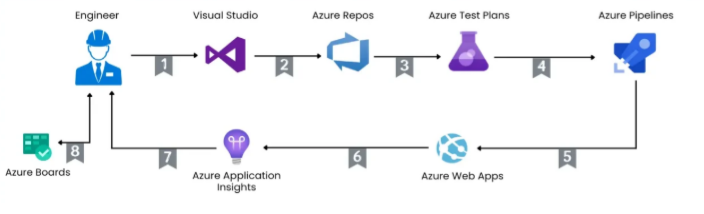
Understanding the principles of Continuous Integration (CI) and Continuous Delivery (CD); appreciating their benefits; getting to know Azure DevOps Pipelines; different types of deployments and environments; target-driven deployments; testing; monitoring and observability; tools; secrets and sensitive information; performance; reliability; patterns; metadata; and logging form the basis of the methodology [5].
While CI/CD pipelines are well known in the world of application development, their use by the Data Engineering discipline is emerging, primarily in the implementation, deployment, and maintenance of Data Pipelines, Data Science models, and Data Warehouse ETL processes. However, enterprises create, store, and maintain many types of data artifacts, including datasets, report models, report subscriptions, Power BI workspaces, service connections, and many more. Providing one-click deployment automation for all types of data artifacts, together with end-to-end monitoring capabilities, can yield considerable savings over the total cost of ownership [6].
Equation 1: Dependabot merge condition
The paper says all required Dependabot PRs must be merged before the CI pipeline can pass.
So define:
This gives the first rule:
2. Background and Rationale
Organizations are now collecting more data than ever, and this data is being processed and analyzed to support better planning and decision making. However, many data engineers and analysts still rely on the old way of moving data, by writing scripts and manually executing them to migrate data across different environments [7]. This can be time consuming, and tedious, and can sometimes lead to data transfer failures due to missing access rights or insufficient computing power. Automating those tasks would therefore free engineers and analysts to focus on more important work [8].
To make it easier for data engineers and analysts to migrate data across environments, the enterprise CI/CD pipeline was designed to automate the deployment of data artifacts — basically everything that is not compute code. A pipeline consists of YAML definitions for building, testing, and deploying data artifacts in Azure DevOps, used by enterprises with Microsoft Azure as their cloud service provider. It also provides security considerations, such as data classification and secrets management [9].
2.1. Scope and Objective
To meet demand and minimize risk, CI/CD practices need to be embraced for all code, not just application code. In large enterprises with significant data teams, CI/CD for data teams also needs to be enterprise-scale. Using data teams as proxy for other non-application teams (ML, Infrastructure) also requires tooling that supports the uniqueness of their workflows and assets. CI/CD for data pipelines does just that—it provides capability and scaffolding that simplify enabling CI/CD [10].
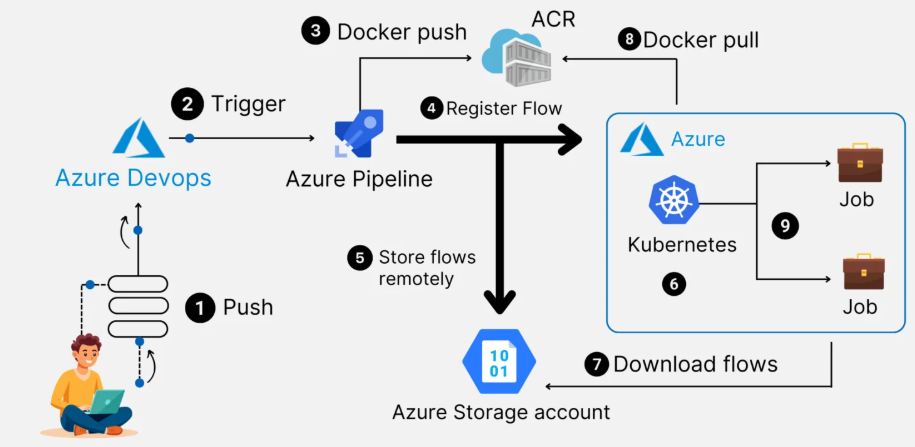
Centralized enterprise tooling services can help with that across an entire organization. For data artifacts in Azure Cloud, a CI/CD infrastructure was developed that helps data teams (and other data-related units) independently deploy and manage the CI/CD lifecycle of their data pipelines, data artifacts, and security secrets. Leveraging Azure DevOps, different parts of the CI/CD lifecyle for data comply with best practices and thus minimize risk for data pipelines, ML model ingestion, and data warehouse setups—automating what these teams do for the non-data teams. CI/CD for data pipelines is only one part of a bigger organization-wide Container-as-a-Service/Platform-as-a-Product model; this focus is on the data artifact pipelines that are part of it [11].
2.2. Literature review
Automation of the data-artifacts build-and-deployment workflow using CI/CD principles offers many benefits. New data artifacts can be created, promoted through multiple environments, and stabilized under development while existing artifacts are made available in production. They provide valuable telemetry data on the CI/CD process, deliver the artifacts to short-lived and transient consumer environments, and enable validation before releasing them to production. Pipelines-as-code properties, templating, and module storing model make it reuse across multiple domain projects [12]. The effort is structured in a way that new modules can be added quickly, and environment promotion requires only minor YAML changes.
Running pipelines in isolated accounts allows independent life cycles and enables observability, monitoring, and troubleshooting with the right level of information released [13]. Data pipelines can be structured using a metadata-driven approach and orchestrated using tools such as Azure Data Factory. During the automation of enterprise data-lake ingestion, metadata is captured on the files ingested, and a data manipulation data warehouse-landing zone module is created to automate the orchestration and business logic processes for landing-zone conversion. Validation and logging data are captured as CI/CD-quality assurance and telemetry for the completed job. Pipeline modules and templates operate in a test-and-validate environment before being promoted to production [14].
Equation 2: SonarQube quality condition
The paper requires code checks through SonarQube.
Define:
So:
3. Architecture and Components
Data Artifacts and Versioning Data artifacts are critical contents from which enterprise management information is produced. Business intelligence reports, analytical reports, dashboards, and data science models all require proper data artifacts to deliver results. These artifacts, e.g., tables, views or machine learning models, need to be properly tested before they can be consumed. The Azure DevOps pipelines for testing and building these artifacts must be production grade [15].
Enterprise CI/CD pipelines for Data Artifacts must be implemented in a manner to allow for production quality testing and automation. Data artifacts used for testing and evaluation require data quality checks, but they are not consumed in business management and decision making. Azure DevOps CI/CD pipelines must support lab and production versions of these life cycle phases [16].
Azure DevOps Pipelines: The Azure DevOps pipeline engine must support automated SQL database, SQL Data Warehouse and Machine Learning model CI/CD. Artifact content protection, metadata management, telemetry, secrets management, and audit logging are essential to minimize business risk [17]. The solution must implement different sets of enterprise CI/CD pipelines for Data Lake ingestion, Data Warehouse automation and Data Warehouse machine learning model automation.
3.1. Data Artifacts and Versioning
The term data artifacts encompasses databases and data objects (files, queries, report definitions, models, configurations) used for data engineering and analytics purposes. The growing importance of rapidly evolving data models — such as those underlying Data Lakes, Business Intelligence dashboards and reports, and machine learning products — is widely acknowledged. However, while the significance of these data artifacts is unquestionable, their development and operations cycles are not as well established as for applications that rely on code [18]. An enterprise DataOps framework is needed to empower rapid prototyping and stakeholder engagement while ensuring stable environments and production releases.
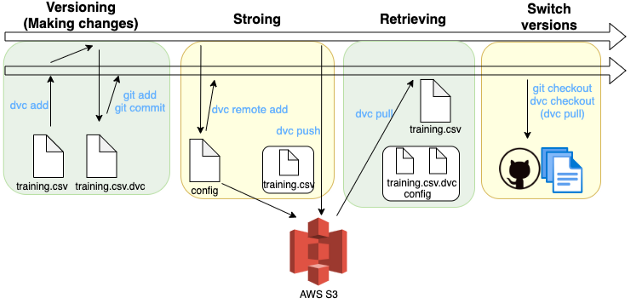
The lack of formal source code management mechanisms for data artifacts has a direct consequence: the artifacts created with team effort for production use are frequently used unrevised and untested for validation and testing, if at all. As a result, these unrevised and partial prototypes are frequently the source of sporadic production quality problems [19]. An appropriate source code management strategy for these artifacts is therefore imperative. This requires one or multiple Git repositories — a service offered by most enterprise source control solutions — plus a well-defined branching strategy that delineates the staging and test environments. Furthermore, the user permissions must also be carefully defined to avoid unauthorized data tampering during validation and testing [20].
3.2. Azure DevOps Pipelines
Azure DevOps Pipelines provide CI/CD capabilities and support both traditional software projects (e.g., .NET, Python, etc.) and data-oriented projects (e.g., Power BI, Data Factory, Azure Synapse, etc.), thereby enabling the automated end-to-end management of data artifacts [21]. Pipelines can be created using YAML or visual editors; the YAML syntax is preferred as it supports versioning and promotes reuse through templates. Utilizing pipeline-as-code thus enables maintenance of CI/CD pipelines for data projects in an enterprise-standard way, along with other data artifacts such as Power BI reports, Data Factory, and Synapse pipelines. Data-driven yet pipeline-as-code, pipeline templates target the Data Factory, Synapse, and Power BI spaces with Cloud Data Engineer-specific managed identity privileges [22].
A staging repository stores repository templates that power CI/CD Pipeline-as-code in Azure DevOps for Data Projects and Data Factory jobs. This central repository contains YAML templates for YAML pipelines in a consumer repository/project. An AzCopy template is available to facilitate the Data Lake Enterprise Ingestion Script, and template-driven CI/CD solutions ensure progress tracking and observability of enterprise ingestion jobs from source to destination [23]. The CI/CD templates cover Data Lake ingestion jobs for Azure storage containers, Data Factory repositories, and Data Warehouse automation. Common CI/CD features—artifact caching, status caching, metadata generation, and secrets handling—are built into the YAML templates. They also manage credentials for Multiplatform CI/CD hosted agents by integrating directly with Azure Key Vault [24].
Azure DevOps Service Connections designate datasets containing required secrets; these can be accessed using an Azure Key Vault-based secrets store. CI/CD deployments are directed by environment tags; the templates detect and apply stages corresponding to the consumer pipeline execution environment. Data processing jobs with long execution times are parallelized to maximize throughput while keeping resource cost low, and these jobs deploy metadata in a structured manner to track job status and lineage [25].
Equation 3: JSON/YAML validity condition
The paper requires valid JSON/YAML format checks.
Define:
So:
4. Methodology
A step-by-step CI/CD implementation plan, detailing the complete DevOps lifecycle for a project beginning with Azure DevOps source control and ending just prior to production activation, is provided as a template [26]. Careful attention is paid to the branching strategy (using feature branches that support pull requests) and, where possible, to the adoption of CI practices, so that the resulting Azure DevOps pipeline yaml files not only serve as gatekeepers for quality assurance but that code validation and builds triggered by every push (or pull request) always complete in a reasonable time frame [27].
Code is versioned using Git capabilities in Azure DevOps and is organized in an appropriate branch structure to support parallel development by different teams [28]. Every supported product data lake and the data warehouse back-end injected by the Enterprise CI/CD Pipeline for Data Artifacts have an associated branch where further development activity can be performed and eventually merged back to main. All Azure DevOps pipeline templates supporting the Enterprise CI/CD Pipeline for Data Artifacts also live in a dedicated branch [29].
4.1. Source Control and Branching Strategy
The design and automation of Continuous Integration (CI) and Continuous Deployment (CD) pipelines by enterprise data engineering teams for data and AI/ML artifacts hosted in Azure DevOps repositories with automatic promotion across environments from Dev through Test / QA to Production are discussed for the complete development lifecycle, from source control and branching strategies through automation and monitoring of CI/CD pipelines [30].
Data and AI/ML artifacts such as Azure Data Lake ingestion pipelines, Azure Synapse Analytics data warehousing pipelines, Azure Databricks notebooks, Azure Data Factory pipelines, and Azure Machine Learning pipelines are hosted in a compliant manner in Azure DevOps repositories [31]. Secrets and sensitive data such as service principal and connection string passwords are stored in Azure Key Vault accounts, with key vault references in place for all deployed resources to access the secrets. Continuous Integration (CI) practices for data and AI/ML artifacts in Azure DevOps ensure quality checks, detection of build-breaking changes, stamping of metadata for observability, and telemetry for debugging and troubleshooting later during product use. These CI practices are built using YAML templates, enabling dynamic referencing of repository folders, pipelines, and services [32].
The enterprise Git-based branching strategy ensures that work-in-progress changes are isolated from the Main branch (also known as the Production branch), preventing breaking changes in the deployed solution [33]. Only completed and approved changes are merged from feature or task branches to a release branch and then to Main. The CI pipeline is triggered on commits to the Main branch but cannot be run manually, ensuring that proper merging controls are in place, and it is audited. Another dedicated separate pipeline is available for deployment to the Dev environment, triggered by commits to the Dev branch [34].
Equation 4: Semantic model validation condition
For data models, the paper requires semantic model checks.
Define:
So:
4.2. Continuous Integration Practices
Branching strategy and CI practices must be defined for data objects stored in that repo. For example, in the context of a Data Lake, the source control branching strategy must ensure the code run from main ingress data sources should not be modified. Hence a YAML template that triggers the build as PR validation, merges the code if all validations are succeeded and holds if the validation fails is recommended [35].
For objects such as a data warehouse, models, cubes, DDLs, UDFs, or any other data objects from code repository, a master branch is needed and the strategy must ensure that any push is only allowed from an authorized personnel. The CI pipeline must ensure the following checks are in place:
- All required Dependabot PRs are merged. (if the pipeline has testing enabled)
- Code checks are run through SonarQube and report is analyzed. (if the pipeline has testing enabled)
- Valid JSON/YAML format checks (if the pipeline has data validation enabled)
- For data models, equivalent semantic model checks (if the pipeline has data validation enabled)
- For data models, every reference is present or being called in any other open model (if the pipeline has data validation enabled)
- For Incremental data models, the watermark column is present in all incremental sources (if the pipeline has data validation enabled)
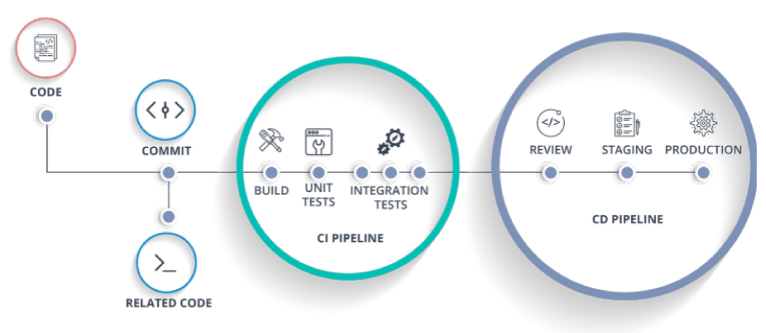
Additionally, the CI pipeline must enable testing & run as PR validation and then build & push into the Dev environment (non-Prod) upon merge into main/master branch [36].
5. Objective of the Study
The objective of the study is to establish enterprise CI/CD pipeline automation for data artifacts using Azure DevOps, enabling enterprise data teams to implement CI/CD testing, quality control, observability, deployment, and release management for data artifact projects stored in the Azure Data Lake Storage Gen2 (ADLS Gen2) [37]. Addressing common problems faced in enterprise data projects—such as the risk of deploying untested code, low code coverage, the need for manual testing and promotion to production, and a lack of monitoring and auditing—the study proposes a systematic approach to versioning, life cycle management, and observability. More broadly, it aims to serve data teams with better engineering practices, similar to mainstream application development teams [38].
The objectives are sub-classified into six categories. Data within the ADLS Gen2 is classified into three tiers—development, pre-production, and production—in order to clearly delineate the various stages of data projects [39]. Access to data is therefore secured based on data classification. Secrets stored in Azure Key Vault are securely consumed and managed by the pipelines using Azure DevOps. SAS tokens are auto-generated and used to enable temporary access between external storage and ADLS Gen2 for ingestion purposes. Sensitive information contained in custom datasets, such as database connection strings, is encrypted using Azure DevOps Secure File variables [40]. Metadata related to data projects is stored in a custom metadata repository and accessed through a shared library for lineage tracking. YAML pipeline templates are implemented to avoid pipeline duplication, enabling multiple teams to use the same template for data artifacts across the enterprise. The entire validation and promotion process are automated, with staging bypassed if no changes have occurred in the earlier stage [41].
5.1. Data classification and access control
Protection of confidential personal data is paramount, and additionally, there are regulatory restrictions around when, how, and with whom certain datasets can be shared [42]. Data access control enforces these policies, allowing only certain organizations, functional groups, or combinations thereof to access specific datasets. Access control rules are managed through Azure Data Lake Storage ACLs. Data classification management monitors the classification of datasets in the data lake and provides alerts for stale or expired classifications. Workflows enforce classification according to the classification requirements outlined in the enterprise data governance framework [43].
Data classification status, along with compliance with classification requirements, is tracked and reported through data governance dashboards [44]. These dashboards, however, are themselves data artifacts that require ingestion, processing, and/or publication to keep them current whenever the underlying datasets change. Data compliance with the classification management policy is achieved through metadata-driven solutions, which derive a list of compliance check datasets and associated organizational units through metadata tooling for data artifacts. These lists drive the CI/CD implementation of the compliance checks, with the data access control and classification management solutions presented as typical use cases [45].
Equation 5: Reference completeness condition
The paper requires every reference to be present or called in another open model.
Define:
So:
5.2. Secrets management and encryption
Sensitive information such as service credentials and storage account keys can accidentally be revealed through source control. Secrets management prevents such leaks by prohibiting the inclusion of secrets in the code [46]. Azure DevOps has built-in mechanisms for secret storage: variable groups can store secrets and key vaults can store secrets or certificate private keys. The former can be referenced in a YAML pipeline but exposed when the pipeline executes. To ensure secrets in key vaults are not exposed in Azure DevOps logs yet are available to deployed services, Azure Key Vault Secrets Task can provision secrets only for release deployments. This Azure DevOps task requires a service connection with permission to read the secrets [47].
Secret encryptions are important when secrets are stored in source control. All variables defined within a variable group in Azure DevOps can use the –isencrypted option for storage [48]. When True, these variables are encrypted using the asymmetric key associated with the project in Azure DevOps. The –issecret option can also be set to True to mark secrets as secured. When True, the variable value is not logged in the build log and is instead shown as asterisks. Although not strictly a secret, storage account credentials are also sensitive and so marked as secured. Other sensitive values such as the repository PAT and Service Connection are marked as secrets to prevent leaks during CI/CD [49].
6. Research Summary
Metadata management, data lineage tracking, and data classification dictate how data can be managed securely and be made available to the right persona at the right time. Metadata about data artifacts including business glossary, data model, risk and compliance metadata, cataloging and classification metadata, operational metadata, and technical repository metadata need to be captured and managed. Data governance determines how the business manages effectively and responsibly its data and derivative information. Data governance focuses on the policies and standards for the management of data assets.
The classification of data based on its business value and risk is important for its management. The data classification framework that is integrated with the key elements of the enterprise security framework helps to manage the data. Sensitive data is encrypted and protected using data masking techniques. Secrets involved in data ingestion and transformation processes are managed centrally using key vault services [52].
Promotion and stabilization processes help to develop the CI/CD pipelines for data pipelines and other non-standard code development. These processes complement the source-control definition and implementation described along with the change management and quality assurance strategies [53]. Template-based creation of CI/CD pipelines for data artifacts in Azure DevOps also supports these objectives and allows auto-generation of CI/CD pipelines for a variety of data artifacts (for example, data pipelines, notebooks, scripts, custom activities). Automation of metadata, data catalog management, data lineage tracking, and metadata monitoring holds the key for stress-free CI/CD pipelines. Monitoring data movement, mask-sensitive data in non-production environments, data quality metadata generation, and data quality rule evaluation complete the quality assurance functions [54].
6.1. Metadata and lineage tracking
Although not mandatory, capturing of metadata related to automated data artifact CI/CD processes can help audit them more easily [55]. Furthermore, lineage tracking capabilities provide better reasoning when a SKD execution fails. Azure Synapse Pipeline automatically populates the monitoring capabilities for data pipeline executions, Azure Synapse Analytics Management REST API can be called from other Azure services to augment ingested artifacts register. An Azure DevOps extension that leverages the Janus Graph Database can associate DevOps metadata with data artifacts, allowing artifacts metadata to automatically populate the system with the DevOps metadata. The metadata stored in the Janus Graph can be queried for detecting lineage for DevOps artifacts that are data artifacts [56].
6.2. Artifact promotion and stabilization
In Azure DevOps, a build pipeline with artifact publishing is commonly used to promote build outputs from development to test and production environments [57]. Although build pipeline artifacts may not be intended for direct consumption, the pipelines can still be useful for testing data integrity and for quickly establishing test and production environments after a build succeeds. For such artifacts, the test stage should check the integrity and correctness of the artifact and the production stage can simply copy it from the corresponding artifact location [58]. A sample data quality testing stage is provided in the YAML pipeline template, which can be customized based on the data quality framework in use.
In addition to the data quality tests in the pipeline, metadata-driven rules in the staging and production environments help ensure that the right data artifact is promoted into the right location after passing the tests. These rules, expressed in the CIA project metadata repository (Section 5.2), speed up deployment to the production environment after all the changes have been approved. Similarly, they also govern the promotion of artifact builds to the staging environment for final validation. The monitored-data CI pipeline provides a demo of this pattern. It builds and tests multiple data products, including an Azure Data Lake Storage Gen2 account with initial data, and then deploys them in parallel to the staging environment for monitoring purposes. After the promotion passes, the staging data products are made available for data monitoring [61].
7. Result
The following types of results were achieved:
YAML pipeline templates for different phases of the CI/CD process were created. The templates are flexible enough to be reused for several types of CI/CD scenarios. The trigger conditions implemented in the templates support a delay in pipeline starts [62].
A template-driven deployment mechanism was implemented, using a master YAML pipeline to trigger multiple templates in a sequence [63]. Each trigger passes down a set of parameters specific to an environment or a region. This approach allows the teams to define the parameters locally in their preferred format and minimizes the risk of human errors when setting up the environments [64].
7.1. YAML pipeline templates
YAML pipeline templates are used to define pipeline steps that are common and can be reused by different pipelines [65]. Built-in Azure DevOps templates can be leveraged to define jobs that will build and validate Azure Resource Manager (ARM) templates, validate Cross-platform Command Line Interface (CLI) scripts, build SAS tokens, and publish Power BI reports in the CI/CD pipelines for Data Artifacts. In addition to built-in templates, custom YAML templates are created to validate metadata for Data Artifacts, validate and deploy the operationalization of ML Models, build and configure Key Vaults for Data Artifacts, and capture data pipeline parameters that will be triggered by Azure Data Factory (ADF) pipelines.
Artifacts that are read from source control while running the production-ready pipelines are considered to be user-defined templates [68]. The use of custom YAML templates for CI/CD pipelines ensures that these templates are tested, reviewed, and version-controlled to ensure high quality. An individual test pipeline is created for these templates, and they can then be reused in other CI/CD pipelines once they have been validated in the test pipeline [69].
7.2. Template-driven deployment to multiple environments
Backing up the template-driven approach is the set of parameters and default values that support auditing across environments, directory structures, and logging methodology. Parameters are defined for all possible variations anticipated – the key requirement is to validate the proposed variation against a package's metadata for the environment – and templates are built to check for the required parameters. When building for a non-production environment, validating packages from other environments and logging into non-standard file locations are optional.
Package metadata indicates how a package is to be deployed in multiple environments through either Azure Data Factory or a dedicated Azure DevOps pipeline. Data-landings packages without a corresponding production environment entry can be generated for enterprise ADF data ingress pipelines, although, at the moment, these too must reside in the dedicated pipeline repository.
8. Observability, Monitoring, and Troubleshooting
Observability and monitoring of the data artifact pipeline are of critical importance. Enabling the logging capabilities can help track the transformations within the individual tasks and the results can help in troubleshooting when there are failures. The operational telemetry for the CI/CD pipelines themselves can be captured to give insights about pipelines that are failing frequently or for long periods of time or any custom metrics that might be required. These can then be exposed through dashboards on Azure DevOps for monitoring [70].
An example of such a CI/CD metrics dashboard is included below. It provides information such as real-time build and release status with heat map-based failure reasons identified for the builds. It further provides details on failure distribution across CI/CD pipelines, across different teams, as well as across the Azure DevOps agents. Some of these metrics can also be useful to the infrastructure & operations teams for troubleshooting issues with the underlying Azure DevOps services stack.
8.1. Logging and telemetry for data artifacts
Robust logging and telemetry capabilities form the cornerstone of every production-ready solution implementation and observability should not be an afterthought. Telemetry for data artifacts contains information about running Continuous Integration (CI) tasks and their results. Each task logs information about the inputs, outputs, and any direct connections to the environment. Task logs are captured as custom events in Azure Application Insights to enable richer analysis and visualization [66].
Logs recorded in standard format can be easily consumed by a log aggregation service for further processing, enhanced analysis, and alerting. Multiple data processing engines support telemetry logging, but integration typically requires additional work. A pipeline component for a data processing engine that does not have built-in telemetry support allows the previous pipeline to be extended to record task execution results in a consistent format [71].
Telemetry logging serves as a fundamental feature shared by all CI tasks for data artifacts. To eliminate the need for live execution of these tasks, a network of programmable custom test events is established. Direct connections between CI tasks and the environment provide the information needed to use this network. When building a task step installer, the complete information about connected endpoints is accessible. For tasks that require all data to pass through a specific component, the implementation can directly install the component, passing the task inputs and capturing the outputs.
8.2. CI/CD dashboards and metrics
Using the telemetry data collected by the logging module, the CI/CD framework for data artifacts exposes customized and specific dashboards, metrics, and alerts for monitoring the data processing activities. The objective of this monitoring solution is twofold. First, it should provide dashboards similar to the classic CI/CD tools for the first-time users of data pipelines so that they can easily understand and analyze it. Second, it should ease the production support activities for the data pipeline engineers and SREs by exposing CI/CD-like dashboards depicting important monitoring and alerting metrics for the deployed data pipelines [67].
A data pipeline bid on Azure DevOps collects the telemetry emitted by the pipeline and processes it to populate a custom log analytics workspace. The processed telemetry is visualized in multiple Azure Dashboards and made available to the users.
9. Performance, Reliability, and scalability considerations
To make the Azure DevOps CI/CD pipelines for data artifacts performant, reliable, and scalable, several practices can be employed, including parallelization to maximize data movement and processing throughput, caching to reduce pipeline execution time and cost impact, and preparation of the pipelines to be executed in a reliable manner across multiple teams.
Azure DevOps Service provides pipeline caching capability that can reduce any subsequent execution time involving builds that depend on the same inputs. Cache targets are defined with a key identifying the archive and actual paths in the working directory. In the case of data artifacts, the effective location to introduce caching is for the underlying data processing builder images. It is possible to associate the image name and target tags with a cache option that will use the image layer cache service to speed up building the underlying builder Docker image needed. A separate caching infrastructure is also available for custom external code packages utilized by the underlying images [59].
9.1. Parallelization and data processing throughput
Data processing tasks must execute with minimal latency. Typically, the Azure Data Factory (ADF) pipelines executing these tasks are created with transformation activities representing the data processing units across multiple data-processing clusters. During the execution of the pipeline, ADF automatically parallelize the unit operations, constrained only by ADF service throttling limits on the number of concurrent activity runs.
During the exploration of the CI/CD integration, it was determined that with the right resources at disposal, a single data-processing cluster can host multiple processing tasks executing in parallel using CI/CD and be running multiple instances of a particular data-processing service writing to the enterprise data lake. Thus, the CI/CD architecture configuration for data-artifact CI/CD in either Azure DevOps or GitHub can support horizontal scaling of an enterprise data-processing service from a CI/CD perspective—especially for entities running low-cost higher latency burstable service tiers. Cost is inverse to throughput for the data-processing services, and these can be scaled up or down based on requirements [60].
9.2. caching, artifact caching, and minimize rebuild
The Azure Pipelines caching task can greatly improve pipeline performance by storing certain directories and files shared across builds that don’t change often, thus reducing the time required to copy, restore, or build those files. These caches can store enormous amounts of data, with a combined maximum of 1 TB on agent disk and up to 100 GB for each individual entry under Azure-hosted jobs.
Caching is most beneficial for tasks such as dependency copying and installation, as well as custom pre-build tools that convert the repository and its dependencies into a ready-to-use format for the deployment job. Caching is also crucial for machine learning projects and other contexts requiring the construction of large model files, and should always be used for jobs that clone huge repositories and have longer running build and test tasks, even if it only provides a speed-up of several minutes over a single run.
Artifact caching is an extension of pipeline Caching that offers the same performance benefits. Artifact caching stores files produced or downloaded by one job that are later consumed by other jobs in the pipeline run, making such jobs run much faster. Artifact caching is automatically enabled for jobs that use the Azure Pipelines Linux and Windows agents by default when enabled in a pipeline’s YAML [72].
10. Deployment Scenarios and Case Studies
Two deployment scenarios illustrating the breadth of the solution are described, focusing on the CI/CD aspects as they pertain to data artifacts. The first demonstrates the orchestration of data ingestion into a data lake. The second illustrates the CI/CD of data transformation and ingestion into a data warehouse.
The enterprise data lake ingestion workflow encapsulates the automation of extract-transform-load (ETL) processes for the ingestion of numerous data sources, engineered for ease of manageability and extensibility. External data sources may include a wide variety of heterogeneous data with different formats (CSV/XML/JSON documents, SQL tables and views, REST APIs, NoSQL collections, etc.), source systems (cloud/on-premise, log files, streaming services, etc.), and destination (data lake, data warehouse, data mart) structures [50].
Data flow and transformation mapping are managed by Azure Data Factory pipelines, with jobs triggered on an ad-hoc basis, scheduled on a periodic basis (daily/weekly/...), or activated as soon as source data become available. Data copy jobs are driven by metadata stored in relational tables, with continuous integration (CI) pipelines set up for the promoted changes and dedicated monitoring dashboards exposing runtime metrics.
The second deployment scenario illustrates the CI/CD automation of a data warehouse, which transforms and loads data from the data lake into the warehouse, consolidating data targeted for analytics consumption.
The solution can also be extended to enable CI/CD automation of the construction and maintenance of enterprise data marts, which typically accommodate the business-specific dimension modeling.
10.1. Enterprise data lake ingestion
The following outlines the data lake CI/CD ingestion and data-loading pipeline, which enables concurrent processing for rapid automation of enterprise-scale ingestion into Azure Data Lake Storage. Hundreds of terabytes of data from multiple sources fed into the data lake during multiple weekly load cycles. Schema-on-read was used to prepare the ingested data for downstream analytics workloads.
The strategy demonstrated here was operationalized by leveraging the template-based YAML pipeline architecture highlighted elsewhere in the paper. The architecture eliminates the need for dedicated infrastructure provisioners or data-movement workflows. Data previously staged in AWS S3 was transferred to Azure Data Lake Storage Gen2 using a simple, schedule-driven, template-based YAML pipeline that ran daily for about five weeks. An additional one-time load of 90 TB from AWS data sources was ingested using multiple concurrently executing stages in parallel. Staging queries specified in table configuration files connected to multiple warehouses across Snowflake V1 and loaded multiple Snowflake tables in parallel [51].
10.2. Data warehouse automation
In a multi-cloud solution, the internal snowflake data warehouse is regarded as a bespoke solution as opposed to an enterprise standard. Previous database solutions have raised concerns about information sources and calculation logic housing in separate spaces. Writing the required objects needs to be done based on these considerations and standard practices, so it receives special attention in the CI/CD pipeline.
It is required to deploy before whatever establishes the physical data staging area (PSA). The DS, fact, and dimension table DDL statements would have to be developed in either a single GIT module or various nested GIT modules. Finally, DOT net core data manipulation services and Nodes.js services would have to be constructed in madamdala Fed Module and resta services RRD dot net core module using existing prescribed architecture. The combination of these three activities will facilitate the data warehouse to be established in the snowflake environment. Data management functions on one section data or test segment environment enable the stakeholders to quest and validate.
11. Conclusion
In recent years, enterprise implementation demands and data scale have shifted from data lakes to data warehouses. Consequently, large-scale metastore-managed data migration, data capital consumption across multiple environments, and volume concurrency stress-testing the enterprise commitment to quality data has emerged for supporting mission-critical quality data delivery. In this scenario, through versioning and secrets management for Data-artifacts, huge amounts of Metadata, Decorated YAML Pipelines, and Resource Templates were built to have the push-button capability for CI/CD across all Data-artifacts hosted in Data Projects of Azure DevOps. Telemetry has been infused for Data-Artifacts along with enterprise-ready Azure application insights dashboard to monitor the quality of Data-artifacts deployed into Production. Thus, Data-artifact promotion is better automated, monitored, and executed.
Traditional observability and telemetry for the data engineering layer have been highly fragmented and limited to point-in-time monitoring. Standard CI/CD Templates for Data-artifacts Data-lake Ingestion were built for Azure Data Lake Services tier-1. The same was used to successfully implement enterprise-level data-in/data-out activities for Azure Data Science (multiple) Layer. A Basic set of observability and telemetry pipelines was also setup for Azure Data Science and Data-Engineering templates enabling logging and telemetry. Dashboards were developed to keep a tab on pipeline executions and for alerting of failed executions along with overdue executions.
12. List of important References
Data plays an important role in every enterprise and implementing CI/CD pipelines using Azure DevOps to automate the management of data artifacts is essential. Automating the build and release pipeline for various data artifacts such as a data warehouse, data lake, Azure Synapse workspace, and Power BI report requires addressing various facets: version control, a branching strategy, CI/CD pipeline design, metadata management, monitoring, observability, operational dashboards, and deployment scenarios. This requirement is fulfilled by employing YAML pipeline templates that encapsulate consistent logic across several artifact pipelines and provide a single pipeline that sequentializes pipeline execution across environments. Data classification, role-based access control, secrets management, encryption, logging, telemetry, metadata management, data lineage, and operational dashboards for data artifacts are also implemented.
Enterprise data-essential business processes generate huge volumes of data every day. Organizing the structured and unstructured data into a Microsoft Azure cloud data platform by building a data lake and a data warehouse improves business insights. The implementation of CI/CD pipelines for data artifacts, including data pipelines, is relatively new compared to the CI/CD processes for other development works. The data pipeline, replication activities from one source to another, and automation of Power BI dashboards are now a priority for different organizations. Implementing these using CI/CD pipelines to utilize the benefits of pipelines for data artifacts is essential.
References
- Segireddy, A. R. (2021). Containerization and Microservices in Payment Systems: A Study of Kubernetes and Docker in Financial Applications. Universal Journal of Business and Management, 1(1), 1-17.[CrossRef]
- Gujjala, P. K. R. Optimizing ETL pipelines with Delta Lake and medallion architecture: A scalable approach for large-scale data. International Journal for Multidisciplinary Research, 6(6).
- Sawadogo, P., & Darmont, J. (2021). On data lake architectures and metadata management. Journal of Big Data, 8(1), 1–29.
- Sawadogo, P., Darmont, J., & Noûs, C. (2021). Joint management and analysis of textual and tabular data in data lakes. Information Systems, 103, 101–120.[CrossRef]
- Inala, R. (2021). A New Paradigm in Retirement Solution Platforms: Leveraging Data Governance to Build AI-Ready Data Products. Journal of International Crisis and Risk Communication Research, 286-310.
- Himpe, C. DatAasee: A metadata-lake for virtual data lakes. arXiv preprint.
- Mukesh, A., & Aitha, A. R. (2021). Insurance Risk Assessment Using Predictive Modeling Techniques. International Journal of Emerging Research in Engineering and Technology, 2(4), 68-79.[CrossRef]
- Armbrust, M., et al. (2021). Lakehouse: A new generation of open platforms that unify data warehousing and advanced analytics. CIDR.
- Reis, J., & Housley, M. Fundamentals of data engineering. O’Reilly Media.
- Kleppmann, M. (2021). Designing data-intensive applications (2nd ed.). O’Reilly Media.
- Vassiliadis, P. (2021). A survey of extract–transform–load technology. International Journal of Data Warehousing.
- Kimball, R., & Ross, M. (2021). The data warehouse toolkit (3rd ed.). Wiley.
- Stonebraker, M., et al. (2021). Data lakes: Trends and perspectives. IEEE Data Engineering Bulletin.
- Abadi, D. J. Data management in the cloud: Limitations and opportunities. IEEE Computer.
- Botlagunta Preethish Nandan. (2021). Enhancing Chip Performance Through Predictive Analytics and Automated Design Verification. Journal of International Crisis and Risk Communication Research, 265–285. https://doi.org/10.63278/jicrcr.vi.3040
- Nargesian, F., et al. (2021). Data lakes and metadata management: Challenges and solutions. ACM Computing Surveys.
- Davuluri, P. N. (2020). Event-Driven Architectures for Real-Time Regulatory Monitoring in Global Banking.[CrossRef]
- Chen, M., et al. (2021). Big data: Related technologies, challenges, and future prospects. Springer.
- Hashem, I. A. T., et al. (2021). The rise of “big data” on cloud computing. Information Systems.
- Gandomi, A., & Haider, M. (2021). Beyond the hype: Big data concepts and analytics. International Journal of Information Management.
- Gottimukkala, V. R. R. (2021). Digital Signal Processing Challenges in Financial Messaging Systems: Case Studies in High-Volume SWIFT Flows.[CrossRef]
- White, T. (2021). Hadoop: The definitive guide (4th ed.). O’Reilly Media.
- Kolla, S. K. (2021). Designing Scalable Healthcare Data Pipelines for Multi-Hospital Networks. World Journal of Clinical Medicine Research, 1(1), 1-14.[CrossRef]
- Akidau, T., et al. Streaming systems: The what, where, when, and how of large-scale data processing. O’Reilly.
- Inala, R. Designing Scalable Technology Architectures for Customer Data in Group Insurance and Investment Platforms.
- Chambers, B., & Zaharia, M. (2021). Spark: The definitive guide. O’Reilly Media.
- Botlagunta Preethish Nandan, "Data Analytics-Driven Approaches to Yield Prediction in Semiconductor Manufacturing," International Journal of Innovative Research in Electrical, Electronics, Instrumentation and Control Engineering (IJIREEICE), DOI 10.17148/IJIREEICE.2021.91217
- Li, X., et al. Data pipeline optimization for cloud analytics. IEEE Access.
- Singh, S., & Reddy, C. (2021). Data engineering lifecycle in cloud environments. Springer.
- Gupta, A., et al. Scalable ETL design patterns for cloud data lakes. Journal of Cloud Computing.
- Databricks. Delta Lake documentation.
- Microsoft. Azure data lake storage documentation. Microsoft Press.
- Aitha, A. R. (2021). Dev Ops Driven Digital Transformation: Accelerating Innovation In The Insurance Industry. Available at SSRN 5622190.
- Amazon Web Services. Building data lakes on AWS. AWS Whitepaper.
- Google Cloud. Data engineering on Google Cloud. Google Press.
- Redmon, J., et al. (2021). Data lake governance and metadata strategies. ACM SIGMOD.
- Nguyen, T., et al. Metadata-driven data pipelines. IEEE Transactions on Knowledge and Data Engineering.
- Zhou, L., et al. (2021). Data lineage tracking in large-scale systems. IEEE Big Data.
- Amistapuram, K. Energy-Efficient System Design for High-Volume Insurance Applications in Cloud-Native Environments. International Journal of Innovative Research in Electrical, Electronics, Instrumentation and Control Engineering (IJIREEICE).
- Wang, H., et al. (2021). Data governance in cloud ecosystems. IEEE Cloud Computing.
- Alharthi, A., et al. (2021). Big data analytics: A survey. Journal of Big Data.
- Ranjan, R., et al. (2021). Cloud-based data analytics. Springer.
- Zikopoulos, P., et al. (2021). Understanding big data. McGraw-Hill.
- Chen, C. L. P., & Zhang, C. Y. (2021). Data-intensive applications. IEEE Transactions.
- Inala, R. (2020). Building Foundational Data Products for Financial Services: A MDM-Based Approach to Customer, and Product Data Integration. Universal Journal of Finance and Economics, 1(1), 1-18.[CrossRef]
- O’Neil, C., & Schutt, R. (2021). Doing data science. O’Reilly Media.
- Davuluri, P. N. (2020). Improving Data Quality and Lineage in Regulated Financial Data Platforms. Finance and Economics, 1(1), 1-14.[CrossRef]
- Russell, S., & Norvig, P. (2021). Artificial intelligence: A modern approach. Pearson.
- Sculley, D., et al. (2021). Hidden technical debt in ML systems. NIPS.
- Amershi, S., et al. Software engineering for machine learning. IEEE Software.
- Gadi, A. L., Gadi, A. L. Kannan, S , Kannan, S. Nandan, B. P. , Nandan, B. P. Komaragiri, V. B. , & Komaragiri, V. B. (2021). Advanced Computational Technologies in Vehicle Production, Digital Connectivity, and Sustainable Transportation: Innovations in Intelligent Systems, Eco-Friendly Manufacturing, and Financial Optimization. Universal Journal of Finance and Economics, 1(1), 87-100. https://doi.org/10.31586/ujfe.2021.1296.[CrossRef]
- Gartner. Magic quadrant for cloud data management. Gartner Research.
- Segireddy, A. R. (2020). Cloud Migration Strategies for High-Volume Financial Messaging Systems.[CrossRef]
- IBM. Data lake architecture best practices. IBM Whitepaper.
- Kolla, S. H. (2021). Rule-Based Automation for IT Service Management Workflows. Online Journal of Engineering Sciences, 1(1), 1-14.[CrossRef]
- Snowflake. Modern data architecture. Snowflake Whitepaper.
- Aitha, A. R. (2021). Optimizing Data Warehousing for Large Scale Policy Management Using Advanced ETL Frameworks.[CrossRef]
- Microsoft.Azure data factory pipelines. Microsoft Learn.
- Mangalampalli, B. M. (2021). Scalable Data Warehouse Architecture for Population Health Management and Predictive Analytics. World Journal of Clinical Medicine Research, 1(1), 1-18. https://doi.org/10.31586/wjcmr.2021.1378.[CrossRef]
- Chen, H., et al. (2021). Business intelligence and analytics. MIS Quarterly.
- Kolla, S. (2019). Serverless Computing: Transforming Application Development with Serverless Databases: Benefits, Challenges, and Future Trends. Turkish Journal of Computer and Mathematics Education (TURCOMAT), 10(1), 810-819.[CrossRef]
- Jagadish, H. V., et al. (2021). Big data and its technical challenges. Communications of the ACM.
- Stonebraker, M. (2021). SQL databases vs NoSQL databases. Communications of the ACM.
- Dean, J., & Ghemawat, S. (2021). MapReduce simplified data processing. Communications of the ACM.
- Kolla, S. K. (2021). Architectural Frameworks for Large-Scale Electronic Health Record Data Platforms. Current Research in Public Health, 1(1), 1-19.[CrossRef]
- Olston, C., et al. (2021). Pig Latin data flow language. ACM SIGMOD.
- Amistapuram, K. (2021). Digital Transformation in Insurance: Migrating Enterprise Policy Systems to .NET Core. Universal Journal of Computer Sciences and Communications, 1(1), 1-17.[CrossRef]
- Apache Software Foundation. Apache Hadoop documentation.
- Davuluri, P. N. Event-Driven Compliance Systems: Modernizing Financial Crime Detection Without Machine Intelligence.
- Apache Software Foundation. Apache Hive documentation.
- Riccomini, C., & Ryaboy, D. (2021). The data engineering ecosystem. ACM Queue.
- Gottimukkala, V. R. R. (2020). Energy-Efficient Design Patterns for Large-Scale Banking Applications Deployed on AWS Cloud. power, 9(12).